AI Roadmap for DotVVM
Published: 8/14/2026 2:13:07 PMIf you ever tried using AI tools to generate DotVVM pages, you probably ran into many issues. The AI models are trained on publicly available data on the Internet, but because DotVVM is a niche area and there are not many open-source projects built with it, AI often hallucinates, making up non-existent controls or trying to apply the Blazor way of doing things.
Months ago, we registered the DotVVM documentation repo into Context7, an MCP server that allows AI tools to search in documentation when using a specific library or framework.
However, to improve the quality of DotVVM outputs even more, we have been testing DotVVM agent skills, and we will be publishing them soon.
General DotVVM skill
The main DotVVM skill contains compressed instructions on how the DotHTML syntax works - this prevents the models from trying to use Razor's @if or @foreach constructs, incorrect encoding of double quotes in attributes, and more. It is not 100% perfect, but the number of mistakes it makes is significantly lower than it would be without it.
This skill also contains lists of all components we have in each package, and details about every component. This should help the agent to be sure about capabilities and usage of every component.
DotVVM security skill
This is still a work in progress, and we haven't had much time to test it, but this skill should focus on checking that the DotVVM viewmodel is safe. A lot of issues can arise if the models used in the viewmodel class contain more properties than the page needs, and especially if you don't verify the inputs correctly.
You always need to treat the viewmodel as untrusted, and validate everything you receive from the client on postback. Anyone can open Developer Tools in the browser and tamper with IDs or other information in the viewmodel, and if you don't validate it, you'll have a problem. This is no different from writing API controllers or using other UI frameworks, but people forget. The skill focuses on discovering these problems.
UI prototyping skill
When starting new projects, we use AI for prototyping the screens. In the past, we asked the model to generate HTML files, but this doesn't scale - it is difficult to achieve a consistent look and feel; each page has its own CSS, which may be incompatible across the pages, and it doesn't support more complex components.
Recently, we introduced Tailwind UI for DotVVM - a new set of beautiful, modern components implemented using Tailwind CSS. They are ideal for prototyping new UIs because they provide high-level building blocks.
DotVVM UI prototyping skill instructs the AI agent to generate a functional DotVVM application with consistent UI built using the Tailwind UI package. It knows how to build forms; it has instructions on when to use modal dialogs, tab controls, and other UI elements for more complex scenarios; it makes decisions about the screen layout; and it generates mock data so the application shows something.
We used this in several apps, and it has been great. You start with a UI prototype, iteratively ask the model to fine-tune the screens until you are happy with them, and then follow up by implementing the business logic in the same project.
New DotVVM.CommandLine
With this arsenal, the AI generates DotHTML markup quite reliably. However, it would be nice if it had a way to verify the page doesn't contain errors or warnings.
We already have Compilation Status Page - it can show all problems in each markup file, but the problem is that you have to run the application. When we instructed AI to use it, it worked, but there were a couple of issues:
- The running app locks the libraries, so when AI doesn't kill it and tries to rebuild the project, there are build errors. AI will eventually realize it needs to kill the process first, but this reasoning takes time and costs precious tokens.
- The page reports all errors from the entire app, so again, we are wasting tokens and creating confusion. When you ask AI to make a local change in a single file, it should have a way to check the file individually. If you give it errors from other files, it may get derailed and start doing things it was not supposed to do.
Once we release DotVVM 5.0, you will be able to install DotVVM Command Line as a global tool and run dotvvm lint in a folder with your DotVVM project - it will ensure it is compiled, and print out all errors and warnings, without running the project (so it doesn't trigger EF Core migrations or other things).
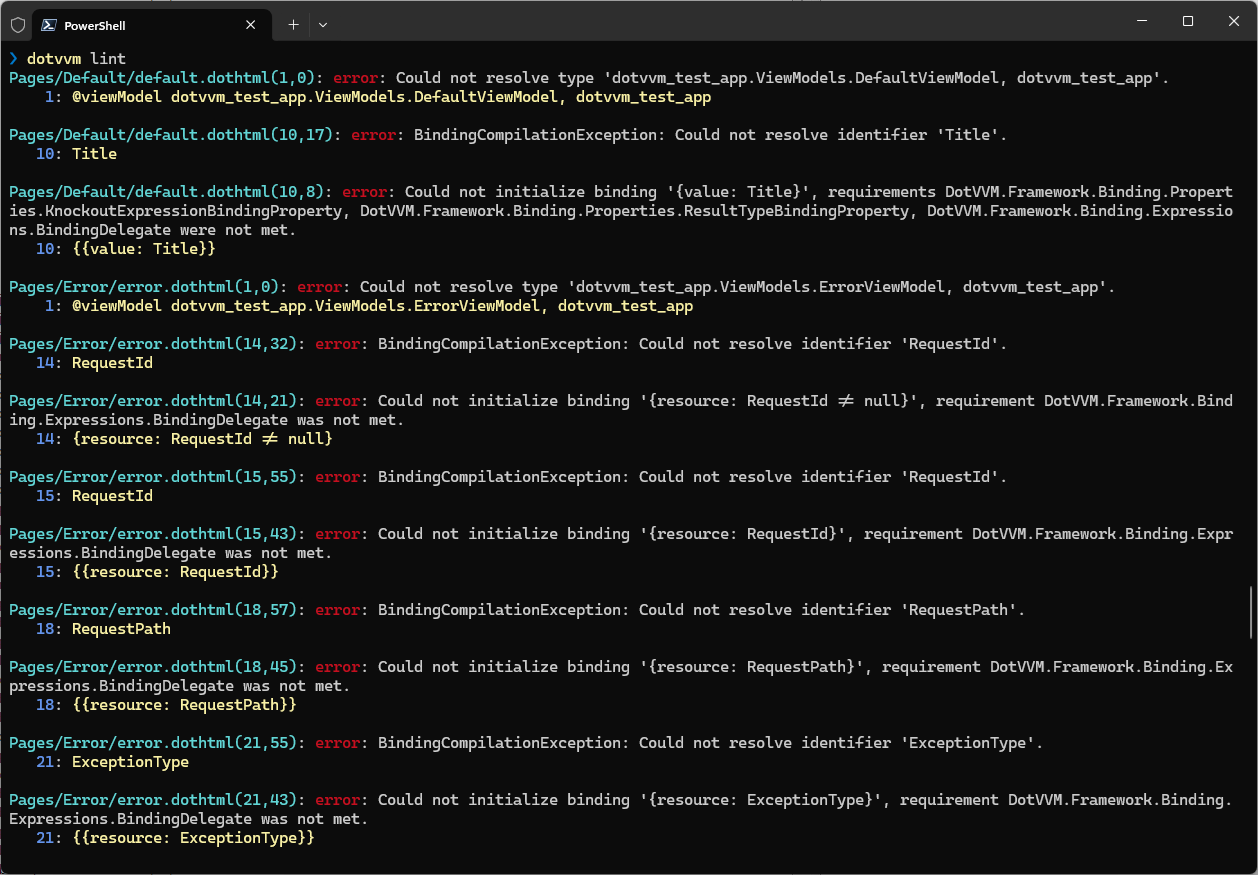
There will be an option to give it the path to an individual file to check, and the DotVVM skill will instruct the AI model to use this command instead of running the entire app and looking at the compilation status page.
All these features will be released soon. Join us on Thursday, August 20 on our live show Tom & Dave discover DotVVM where we will be showing all these things.

I am the CEO of RIGANTI, a small software development company located in Prague, Czech Republic.
I am Microsoft Most Valuable Professional and the founder of DotVVM project.